

Covering in this article:
The switch to mobile first
When responsive webdesign came along, we changed the way of building our websites and webshops. Instead of a separate subdomain for mobile users, we obtained one single web-version: for desktop, laptop, tablet and smartphone users. Easier for content managers, developers, marketeers and SEO specialists to maintain.
But instead of really building mobile first, agencies often started adding more code to make websites more responsive rather than shipping less resources at the same time. We are already transferring more resources to make a website or webshop work in the browser, than Margaret Hamilton wrote as on-board flight software to land Apollo 11 on the Moon. And although main bottleneck nowadays might not be the amount of requests or data, the browser's main thread and CPU is.
Technical implications of PWA
Let's start with some technical implications we have to be aware of when building client side rendered (CSR) solutions, such as Progressive Web Apps (PWA).
HTML versus javaScript
HTML by default is accessible and fast:
- Accessible because link-clicks works across all devices;
- Fast, because HTML is streamed into the browser right away, while being rendered.
As server side rendering (SSR) will return main content within the initial HTML payload, this will give your users an advantage over making your website content JavaScript dependant. Because:
- Someone could have turned of JavaScript (due to privacy or security reasons, by choice, or as part of a company policy such as within some government departments);
- Used device might not be compatible with your JavaScript codebase;
- Users might use cheap or older devices for several reasons, thus less CPU;
- Users might have a bad connectivity, causing a time-out on other (critical, as you are now building CSR) resources.
You can read more on these topics at "User experience implications of PWA".
It is beneficial to have server side rendered pages (and moreover, make them server side cached), so contents will become visible as soon as HTML is being received, instead of forcing the browser and thus visitor to wait on new requests (having all the risks mentioned above).
Technical SEO
Building CSR means that external resources has to be downloaded, parsed, compiled and executed before most DOM manipulations can take place. Yes, I am talking about JavaScript. This will take time for real visitors as well as (clever or less clever) search bots. JavaScript indexing delays are still an issue for Google.
Also consider the amount of testing needed to be sure your pages aren't indexed correctly, but all content is in the right places as well. Browsers as well as search bots are less forgiving when it comes to JavaScript and thus CSR syntax errors, as when HTML and thus SSR syntax errors would occur.
Jan-Willem Bobbink created an SEO infographic based on Google's rendering infographic:

First Meaningful Paint and Time to Interactive
When choosing to build a client side rendered solution, which PWA often is, metrics will be different than when doing server side rendering. The reason is simple: your contents isn't present in the initial payload. New resources have to be fetched (and parsed, compiled and executed) first. On their turn, these resources will re-use JSON content present in the initial payload or maybe even trigger API calls to fetch the actual contents, eventually painting it into your screen.
As illustrated before, the increase of JavaScript while building PWA is impacting the user experience, as the browser's main thread has more work to do, impact CPU and thus user experience.
Educating developers
When having in-house developers, be aware of the need to train or even re-educate your developers within this new building stack, toolsets, frameworks and mindset of building web solutions the CSR way. Although PWA being around for a while, there still is room to discover and improve security, accessibility, technical SEO and performance.
When deciding on an approach to rendering, measure and understand what your bottlenecks are.
developers.google.com
Read more about the role of JavaScript within PWA on the next page.
JavaScript's role within PWA
With the above in mind, we know that JavaScript is the main bottleneck of building CSR (as well as SSR) solutions, such as Progressive Web Apps. There are some risks I often coin, when doing building CSR as most of the codebase will be JavaScript driven.
Moving from server side to client side
One of the risks is that all the work we used to do on the server side, is now being done on the client side, hence Client Side Rendered or CSR. This means, work (building the HTML / DOM) is now done on the device of your users. You, as an agency, are no longer in control of factors influencing the user experience spectrum.
Using frameworks
Most client side rendering solutions are build on top of frameworks like Angular, React of Vue. Such frameworks are adding more weight to the already needed amount of JavaScript, bringing down your First Meaningful Paint metric and extending the Time to Interactive metric due to longer boot-up time. As a result, it may impact main thread blocking and thus user experience. Paul Lewis -a Googler working on ChromeDevTools and co-created of Lighthouse- once wrote a (by now sometimes out-dated) article with a SSR versus CSR comparison of a handful of frameworks (as well as vanilla JS).
Locking the main thread is unthinkable to native developers, because it negatively impacts the user experience so much.
Paul Lewis
Also be aware of framework updates, not only forcing you to update your own codebase, but will also increase the total package-size and thus download-, parsing- and blocking-time.
Third party impact
If that's not enough reason to introduce performance budgets, there is always another big culprit, being third party scripts. Rather see real use cases in video? You can hear more about third party widgets not being your webshop's best friend, within this presentation about third party performance impact from minute 26.
The primary downside to Client-Side Rendering is that the amount of JavaScript required tends to grow as an application grows
developers.google.com
New e-commerce features
Beside the framework you use or third party widgets you include, your shops' features will grow over time. As you will have to deploy them on top of your JavaScript codebase, your codebase and thus earlier mentioned times and metrics will increase as well, impact main thread blocking or janky behaviour and thus user experience.
Read more about User experience implications of PWA on the next page.
User experience implications of PWA
When your SSR website or webshop is suffering from slow loading times, you can always change hosting provider or tweak the server so all visitors will benefit equaly. However, when doing CSR:
- you can't ask all of your visitors to buy the newest phone (because of budget reasons);
- and at the same time force them to always use wifi (because your visitors may be in public transport, on vacation or living in rural area's).
User connectivity
As you won't have any influence on the internet connectivity of your visitors, choosing a CSR strategy could pose a risk. User connectivity on itself will be dependant on several factors, such as location and thus internet coverage, but also the internet plan or quality of the provider.
So, a time-out may occure or users might experience slow loading times for individual resources. Within CSR, the initial HTML payload will refer to new resources, resulting in visitors having to wait for a while before seeing anything meaningful.
Device limits
Users might use cheap or older devices for several reasons. As providers stop offering 3G to move on to 4G, you might expect things will get better. A side-effect could be that users without the funds to buy 4G compatible phones, are falling back on 2G. Or, users travelling through more rural area's are falling back to 2G due to the lack of 3G coverage.
Where CPU is already the biggest bottleneck towards mobile users, such shifts in used devices could make things worse. Fact is, the UX gap among your visitors anything but closing.
Code compatibility and poyfills
Another aspect to be aware off within older phones, but also desktop users, might be code compatibility. With JavaScript compilers like Babel, you can write next generation code and be compatible at the same time. The use but also usability of JavaScript is going strong, with new browser features being introduced. Obviously, not all browsers are up to date (looking at you, Internet Explorer and Safari!).
Luckily, we can use so-called polyfills to inject compatibility. Side effect will be, that you end up inserting only more JavaScript, while those older non-compatible browsers or devices are already suffering the most from CPU bounds. Inserting polyfills will only make things worse, when not chosen wisely.
The server side code only has to be supported in the server, versus a myriad of different clients, which means it is more robust, you might not need to transpile, faster development process, more structure and separation of concerns, a good start to following progressive enhancement and not breaking web accessibility and standard mechanisms.
Andres Vaquero @ The Benefits of Server Side Rendering Over Client Side Rendering
No user engagement
Obviously, when building CSR, most (JavaScript) code will only be downloaded once, being cached on subsequent sessions. While navigating within their session, often no page reloads will take place.
However, those visitors should be able to engagement with your product in the first place. When it comes to user experience metrics, you want the following stages to happen as soon as possible:
- is it happening (First Contentful Paint)?
- is it useful (First Meaningful Paint / Largest Contentful Paint)?
- is it usable (Time to Interactive)?
Especially within pure CSR solutions, it is hard to optimize the FMP and TTI metrics. Even SSR solutions are using JavaScript, for example to process the cart and orders. However, you should aim for early user engagement, or risk losing visitors all together.
In the worst case scenario, when tracking is happening after first party assets should be loaded, it is possible your Google Analytics pageview event will never fire, resulting in un-tracked pagevisits from Internet Explorer or other users of legacy browsers and devices. Meanwhile, your marketing or conversion department might celebrate that all your visitors are on the newest devices.
How to solve
One can improve user centered metrics such as First Meaningful Paint and Time to Interactive, improving user experience at the same time. This involves tactics such as tree-shaking and code-splitting. Some toolsets may do this for you (maybe not always in the most ideal way, but it is a start). Also cherry-pick your polyfills; consider the benefits and use them for critical functions only.
You could consider different rendering strategies, and benefit from technical SEO and user engagement/user experience advantages. Don't trust your analytics; Always be sure to double test your visitors and used devices and browsers.
Read more about Progressive Web App is mobile first and fast on the next page.
Progressive Web App is mobile first and fast
Mobile first and fast, just like Angular or AMP, right? Although both being a Google product, we all know how Angular 1.0 turned out to be. And even AMP pages may end up being slow. When embedding several AMP features, you will need several AMP libraries. As those are relying on JavaScript, those are render blocking, making your pages slower as you have less freedom optimizing.
Clean sheet
The thing is, when being the average online publisher or e-commerce webshop, you might have the feeling that it takes more time and budget optimizing your current situation. This might be the reason why quite some publishers jumped on the AMP train (including other priviliges Google might give AMP equivalent pages).
A new framework doesn't mean you can't mess things up; It might only provide your development team with a clean sheet to start from, while the quality of the end product depends on your implementation. The term PWA doesn't make a shop fast by default, despite PWA being marketed as fast and mobile first.
We forgot about variety of devices
Often, agencies forget that users are using different devices and those devices have different CPU limitations. While forgetting this, we are making the same mistake as when we started building mobile first using responsive frameworks.
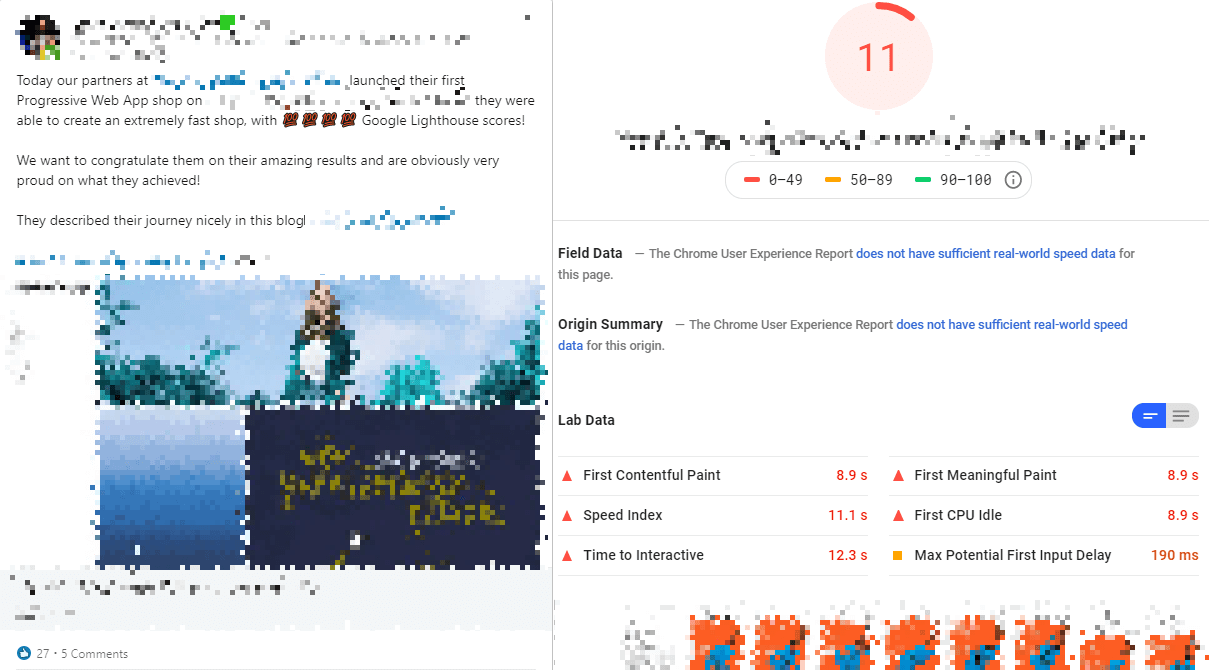
A real-life use case where the PWA supplier and agency was celebrating the 100% pagespeed score, illustrates this. It turned out they changed the default configuration when testing it's performance. They might have:
- changed this setting on purpose, attracting new clients;
- didn't know what this configuration meant (although not being the default setting), not having the desired focus on performance.
So, when will PWA be fast
As a PWA webshop or website doesn't require new pageloads, only new contents will be fetched on user navigation. This means that the so-called skeleton is only loaded once. Most JavaScript resources are only downloaded (with HTTP/2 not the biggest culprit nowadays) and parsed (biggest performance impact nowadays) once, on first page-visit. After that moment, a PWA often will remain fast.
The conclusion here is, as PWA is often build with Client Side Rendering, quite some JavaScript is needed to fill your visitor's screen. As this JavaScript has to be downloaded, parsed, compiled and executed the very first time, this might lead to long render blocking and main thread blocking periods. During these moments, your user might see a white screen or experience janky behaviour, resulting in an early bounce.
As often Client Side Rendering is done by JavaScript import new JavaScript (maybe importing new JavaScript), it is possible that even your analytics tooling couldn't be parsed on time, causing your business to not only miss out on revenue, but also on reliable bounce-rates.
What about skeleton loading?
To address this bounce rate, some solutions might show the user a loading screen with placeholdered area's, telling the user where information might pop up. The user is seeing some kind of skeleton of the website, hence skeleton loading screen.

When it comes to perceived performance and user engagement, skeleton loading is better than spinner icons, while server side rendering where no skeleton loading is needed at all, will be your best bet, improving UX and reducing bounce-rate. But also hybrid rendered PWA will enable you to reduce first time bounce, but may come with new challenges.
Read more about how agencies are doing building PWA on the next page.
How are agencies doing?
Some are making the same mistakes as other agencies tend to do when building websites or webshops the more traditional, SSR way.
No focus on speed at all
Youwe Agency wrote about PWA, although speed not being mentioned. Speed turned out to be a collateral win. This could mean there was never any focus on performance, also suggested by their speed score. A big 'whoops' when you look at their pagespeed score, being 42% and having an FMP of 3.7 and a TTI of 12.5 seconds.

PWA making you blind
Gracious wrote an article about the Budgetplant PWA they've build. They managed to double the conversion by using a PWA on top of a headless e-commerce solution. Although important nuance was missing, another perspective is missing here. Not only was I curious to know what they count as conversion, they most likely also came from a (very) bad use-case, allowing them to improve no matter the alternative they would have choosen.
Instead of PWA being the reason that conversion increased, it might have been the prior solution which wasn't enabling budgetplant to reach full potential. Just like AMP, when you failed building a good shop in the first place, it is very likely that any new platform will do better.
Focussing on the wrong metrics
On top of the article, Gracious also published a whitepaper. As a performance consultant, I found their performance KPI most disturbing. Their whitepaper was stating their Time to First Byte metric improved:

- Google's suggestion towards Time to First Byte is under 200 milliseconds;
- The TTFB of Budgetplant appeared to be 638 milliseconds in 2018;
- Their new TTFB is only 36 milliseconds, a reduction of almost 95%.
That's quite impressive. But only if you don't know anything about how server side rendering (SSR) and PWA (often CSR) works. Unfortunately, this was the only pagespeed metric to be found within the whitepaper.
The nuance missing in their whitepaper and most likely also missing in their field of focus, is that as PWA is client side rendered, only minimal work has to be done on the server in their new situation. Instead of doing algebra, the server only has to do basic math (or even less), spending less time doing so.
Above numbers are their own findings. Based on public data of November, 66% of users had a TTFB of less than 300 milliseconds while the 75th percentile is at exact 300 milliseconds as well. This in itself is a good TTFB, but not groundbreaking.
The heavy lifting is now done on the mobile device. As a result, also the individual metrics shifted. This TTFB metric isn't saying anything about perceived performance or real user experience and thus they should've measured and monitored more UX based metrics instead.
Accessibility as part of Human Rights
Although required by law for governmental organizations only, your website or webshop should be accessible. However, as a non-governmental organization, Beyonce as well as Domino's were sued respectively because of an inaccessible website and webshop. Obviously, PWA can be as accessible as any other solution, but once again, it will only be when we keep focus on accessibility. Often even the very basics of accessibility is missing: knowing where you are while using the tab-key (please don't omit outline property) as well as navigating and opening widgets by using keyboard only (use clickable elements for such actions).
To illustrate: All three PWA e-commerce solutions, including budgetplant and PostNL, are inaccessible.
Trust your framework?
The trend I am noticing, is that agencies are putting trust in build-processes and frameworks, neglecting the impact on user experience. For example, the JavaScript components of Bootstrap are accessible. You can implement it incorrectly however, making your end product inaccessible. The same applies for using Angular, React, Vue or any other framework. Accessibility and performance doesn't come out of the box.
Their purpose often is not delivering a fast user experience, but rather a fast developer experience. But, as a developer, it is still our responsibility to build fast and accessible end products.
Read more about PWA conclusion and take-aways on the next page.
PWA conclusion
That's quite a lot to digest, giving you some CSR and PWA insights from the field, to be informed in time for your next case! Time to wrap it up:
PWA Take-aways
- PWA doesn't mean your shop will be fast because the end product has been labeled PWA;
- By not measuring correctly, it might make you blind for conversion losses;
- Choose the right rendering strategy and apply tree-shaking and code-splitting;
- Testing and maintaining (technical) SEO and different devices will require another (build) strategy;
- You might have to re-educate your employees.
Obviously, it is possible non of these apply. For example, there are PWA suppliers of e-commerce agencies (using PWA) out there who are doing a great job in building performant Progressive Web Apps, maybe doing partial hydration towards optimal user engagement via fast First Meaningful Paint. However, as I pointed out using some use-cases, most cases can still be seen as experimental or incomplete.
Should we stop building PWA?
A PWA might not solve your performance and UX issues as much as you like. Please don't let this be the reason to stop considering, investigating or building PWA's. Because:
- Although, -looking at the Gartner Hype Cycle- PWA might only be in the phase of "Innovation Trigger", I expect great things of the (combination of) features that makes a PWA a PWA and it is only a matter of time before we are used to the offline availability of web apps;
- Meanwhile, choose PWA for the right reasons, don't let performance, accessibility or mobile first be one of them;
- The Progressive Web App ecosystem is causing positive side-effects, such as awareness on (lack of) fast loading times and optimal user experience;
- Individual features of PWA could help address UX and loading times, if done correctly. Headless solutions is another positive side-effect, already done by Shopware, being SSR and thus a traditional solution without the overhead (in its broadest sense) that PWA might introduce;
- Set up performance budgets and accessibility audits;
- Received a quotation? Double your financial budgets as there are quite some topics that may still need attention after launch and even agencies are unaware of.
It isn't too late
Yet again, it the end there are already agencies building fast and even accessible PWA solutions. Not ready for PWA yet? When it comes to UX and conversion, it is never too late to start optimizing your current shop to not only have high user engagement on first visit, but keeping your shop fast on successive page-visits.
Did I forgot something? Do let me know using the comments or corresponding LinkedIn post.


